Thursday, April 17, 2014

Weekly Reflection #11

This week I was introduced to a few new methods and functions that come with python. I couldn't quite wrap my head around some of the information given like augmented assignment operators and string interpolations as I didn't really finish the chapter but I still learned quite a bit. The concepts in this chapter were more shortcuts to some of the things I'd already known from the previous chapter, but they definitely made typing code easier. I learned a new game, I'd never heard of called Bagels. Bagels is a simple game you play with your friend. Your friend thinks up a random 3 digit number with no repeating digits, and you have to guess the word. After each guess, your friend gives you clues on how close your guess was. If the friend tells you 'bagels', that menas that none of the three digits you guessed is in the secret number. If your friend tells you 'pico' then one of the digits is in the secret number, but your guess has the digit in the wrong place. If your friend tells you 'fermi' then your guess has a correct digit in the correct place. However, even if you get a pico or fermi clue, you still don't know which digit in your guess is the correct one. You can also get multiple clues after each guess('fermi pico pico').
Example of the game in python


The process in designing this game was the same as the others starting with a flow chart. One of the important functions I learned this week was getSecretNum() which will generate the random secret number for this game. This chapter introduced a few new functions and methods (random.shuffle(), sort(), and join()), along with a few shortcuts. I didn't get to the other stuff though.

Sunday, April 13, 2014

Weekly Reflection #10

This week I got to take what I learned last week and apply it to the creation of a tic tac toe game. This tic tac toe game was different from the hangman game where you have to guess the word. This chapter ventures into simple artificial intelligence. An AI(Artificial intelligence) is a computer program that can intelligently respond to the player’s moves. This game didn’t introduce any complicated new concepts. As we already know tic tac toe is a simple pencil and paper game played between two people, one is X and the other is O. On a simple nine square grid, the players can take turns placing their X or O on the board. If a player gets three of their marks on the board in a row(whether it be straight or diagonally), they win. Most games of tic tac toe end in a draw with neither players having three marks in a row. In this chapter, instead of having a second human the AI made moves against the user.


In the previous chapter I learned about ascii art, along with various string methods, and elif statements. Before I could actually utilize the AI I had to define a function called drawBoard. This function does exactly what the name implies. What good is tic tac toe without a board? I had to use ascii art to draw up the board.


The ascii art in code


After coding in the art you'd get a board that looks like this:
   |   |
   |   |
   |   |
-----------
   |   |
   |   |
   |   |
-----------
   |   |
   |   |
   |   |


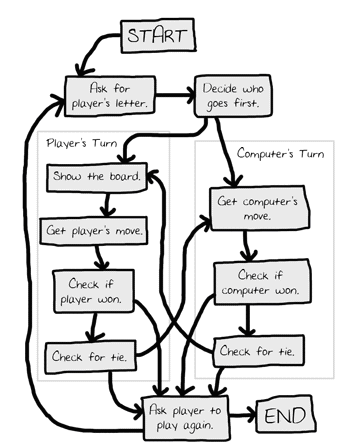
But before I get ahead of myself, just like a couple chapters back, I actually had to use a flowchart, because programming an AI no matter how simple, isn't something that should be done without some sort of organization, you'll likely end up with bugs later on.


After I had that established, the reason I had to draw the board first was because I needed some sort of interface. Next I had to make the board represent a variable. With pen and paper playing tic tac toe, you'd just put the X or O in the empty space, in python, that empty space is represented by a list of strings. Each string represents one of the nine positions on the board. To make it easier to remember the location of each position the number pad was used. 

After I had the board layout figured out. The rest was pretty much just me following the flowchart layout. Ask a player's letter, randomly generate who goes first, wait for the move to be made, and after that constant checks of which player won. Creating a program that can play a game really comes down to carefully considering all the possible situations and outcomes. It's not so much the AI is thinking for itself it's really just using predetermined situations which you code for it. Compare to something like chess or checkers, tic tac toe is simple because there aren't too many outcomes. This AI just blocks the players move if the player is about to win, and tries to win if put in a position to. The AI chooses any empty space on the board, then the center, then the side.


Sunday, April 6, 2014

Weekly Reflection #9

In this chapter, I made use of the flow charts from the previous chapter to start making my hangman game. The hangman game consist of ascii art utilizing Multi-line strings. 
HANGMANPICS = ['''

  +---+
  |   |
      |
      |
      |
      |
=========''', '''
...the rest of the code is too big to show here...

Above is an example of what hangman would look like using ascii art(text art). This chapter was really long and several new concepts(Methods, for loops, Else-if statments..etc) which I'm still trying to wrap my head around where introduced. Methods are just like functions, except that are associated with values. Methods return values just like functions return values. For loops iterate over the items in a list. The range() function is often used with for loops because it's an easy way to create  lists of sequential numbers. Else-if statements, used in python as elif will execute their block if their condition is true and the previous if and elif conditions are false(booleans, true or false conditions). So far, Hangman has been the most advanced yet introduced in the book. With this known, I definitely understand why it's a good idea to use a flow chart.

Wednesday, March 26, 2014

Weekly Reflection #8

Just as I'd said last week, this week I actually don't have anything to blog about. Chapter 8 stressed the importance of using flow charts to plan out your game. Hangman was used as an example because hangman, although very simple, it is very complex when learning to program the game.

Although part of me feels like this was a waste of a chapter(like I could have googled being more efficient with programming), I do also feel it will be very beneficial later when I do actually build up and work on a project. Being a visual learner, it might not be a bad idea to use flow charts, instead of jumping into the code then being lost later, I could go back to my chart so I know what I need to do, and in what order.

Thursday, March 20, 2014

Weekly Reflection #7

I actually don't have much to write about at all this week. Chapter 7 went in full detail about using the debugger. To sum up this chapter I've learned that wrting the programs is only half the work when making games, the next step is making sure the code that I wrote actually works and that's where debugging comes in. Python's Shell actually has a debugger control. Debuggers pretty much let the programmer go through everysingle line of code, one line at a time while examining which lines execute (in what order) and what values the variables contain.
The debugger control in action.
All in all using the debugger is a great way to understand what exactly a program is doing, it's just a very slow process to me. I feel like it would be a lot more effective to run your project, test all of the functions and which ever function isn't working, go to that line of code and adjust accordingly.

Sunday, March 16, 2014

Weekly Reflection #6

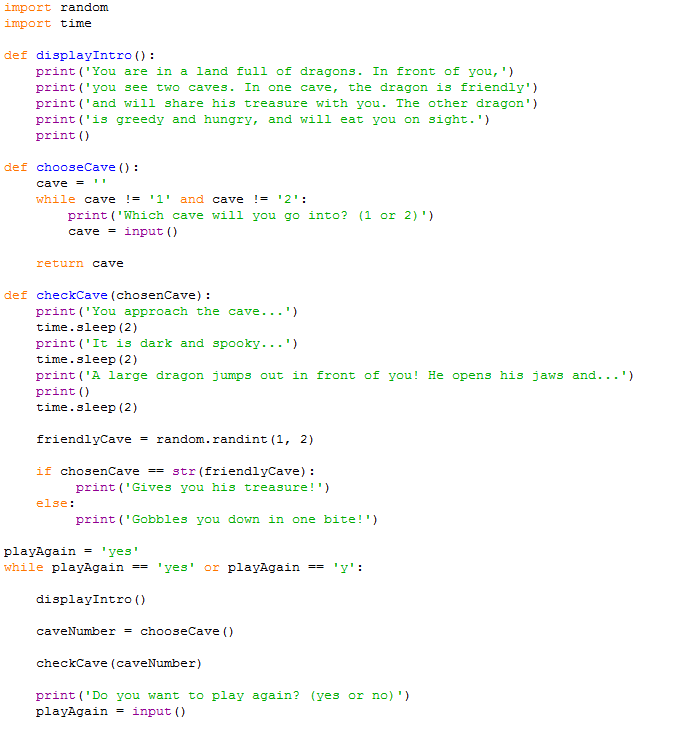
This week I dived into the "Dragon Realm" game. I was introduced to a new way of creating my own game using what I've learned thus far. There hasn't been much to go off of in this chapter because there the reader is just introduced to a code and given a breakdown of how it works.

 In this chapter I learned how to create my own function using the def statement. The def statement is used to define my own made up function that I can later define. The code inside the function is run when the program calls for that function. I also learned that the inputs for functions are the arguments we pass when we make a function call. The function call itself evaluates to a value called the return value. The returned value is the output of the function. I also learned about variable scopes. Variables that are created inside of a function exist in the local scoape, and variables created outside of all functions exist in the global scope. Code in global scope can not make use of code in local scope.
Me playing the game. Going both paths.

Saturday, March 8, 2014

Weekly Reflection #5

This week I didn't really have time to mess around with my hobby but in this chapter I started to learn how to make a program that tells jokes using the print() and input() function. In my book this section was probably one of the shorter chapters. The syntax set up like so; 
  1. print('What do you get when you cross a snowman with a vampire?') #box pops up with joke
  2. input() #play has to hit enter
  3. print('Frostbite!') //after input (enter) is given the joke is told
  4. print() #he third print() function call is just for the sake of spacing
Here we have three print() function calls because we don't want to tell the player what the joke's punch line is, we have a call to the input() function after the first print(). The player can read the first line, press Enter, and then read the punch line.I only got about that far in this chapter due to family related issues.

I took what I learned in the last chapter then applied it here.