 |
| The debugger control in action. |
Thursday, March 20, 2014
Weekly Reflection #7
I actually don't have much to write about at all this week. Chapter 7 went in full detail about using the debugger. To sum up this chapter I've learned that wrting the programs is only half the work when making games, the next step is making sure the code that I wrote actually works and that's where debugging comes in. Python's Shell actually has a debugger control. Debuggers pretty much let the programmer go through everysingle line of code, one line at a time while examining which lines execute (in what order) and what values the variables contain.
All in all using the debugger is a great way to understand what exactly a program is doing, it's just a very slow process to me. I feel like it would be a lot more effective to run your project, test all of the functions and which ever function isn't working, go to that line of code and adjust accordingly.

Sunday, March 16, 2014
Weekly Reflection #6
This week I dived into the "Dragon Realm" game. I was introduced to a new way of creating my own game using what I've learned thus far. There hasn't been much to go off of in this chapter because there the reader is just introduced to a code and given a breakdown of how it works.
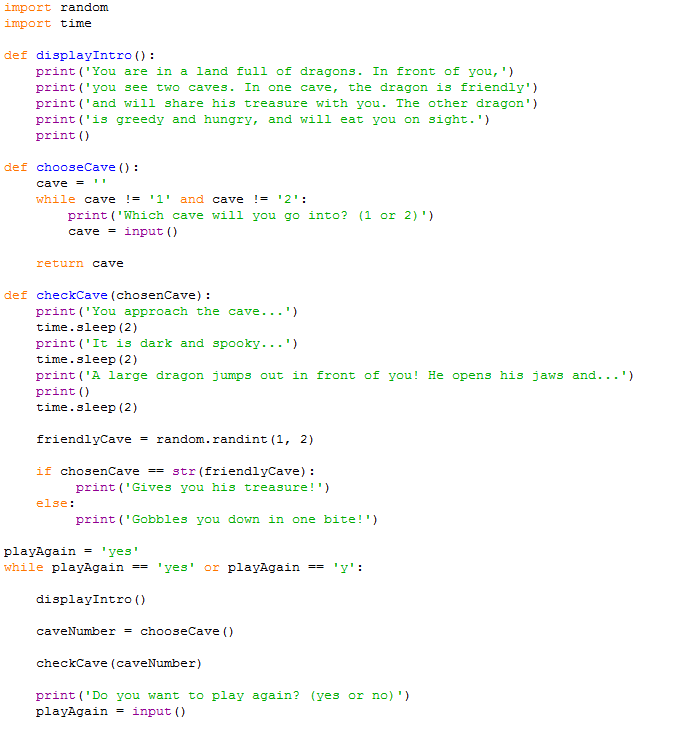
In this chapter I learned how to create my own function using the def statement. The def statement is used to define my own made up function that I can later define. The code inside the function is run when the program calls for that function. I also learned that the inputs for functions are the arguments we pass when we make a function call. The function call itself evaluates to a value called the return value. The returned value is the output of the function. I also learned about variable scopes. Variables that are created inside of a function exist in the local scoape, and variables created outside of all functions exist in the global scope. Code in global scope can not make use of code in local scope.
 |
| Me playing the game. Going both paths. |
Saturday, March 8, 2014
Weekly Reflection #5
This week I didn't really have time to mess around with my hobby but in this chapter I started to learn how to make a program that tells jokes using the print() and input() function. In my book this section was probably one of the shorter chapters. The syntax set up like so;
- print('What do you get when you cross a snowman with a vampire?') #box pops up with joke
- input() #play has to hit enter
- print('Frostbite!') //after input (enter) is given the joke is told
- print() #he third print() function call is just for the sake of spacing
Here we have three print() function calls because we don't want to tell the player what the joke's punch line is, we have a call to the input() function after the first print(). The player can read the first line, press Enter, and then read the punch line.I only got about that far in this chapter due to family related issues.

 |
| I took what I learned in the last chapter then applied it here. |
Wednesday, February 26, 2014
Weekly Reflection #4
This week I got to play a little game. In this game, the computer thinks of a random number from 1 to 20, and the user has to guess the number. The user is only given six attempts, the computer will however, tell you if your number is too high or too low. If you guess within six tries, you win.

 In this chapter a learned a couple of new things. In the screenshots you'll probably notice some of the code in this game from the previous week where I learned about the input function. This week I learned about import statements. Statements are not functions, in the screenshot of the code you'll notice neither import nor random has parentheses after it's name like input() and print(). Besides import statements, other things I learned about this week where modules, arguments, while statements, conditions, comparison operators and if statements.
Friday, February 14, 2014
Weekly Reflection #3
This week in this chapter I learned how to deal with text, so I could start making programs that users can run and interact with. In programming what we call text is strings. Just like numbers, you can also store values into strings like so.

When typing strings you have to put them in single quotes, like I'd shown above in the screenshot. The single quotes are really only there to tell the computer where the string begins and ends. The single strings are not a part of the string's value(it's just hello when printed, not 'hello'). Strings can have almost any keyboard character in them except for single quotes.
String Concatenation
You can add strings together using the + operator which is called string concatenation.
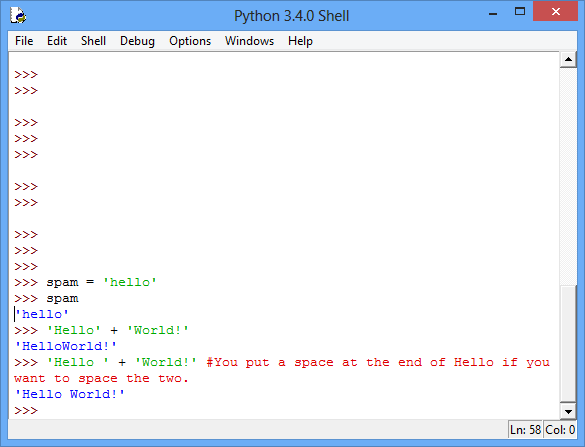
The + operator works differently on strings and integers because they are different data types('Hello' is a string, 5 is an integer).
After going over those two things, this chapter goes into writing programs in IDLE's file editor.
The book came with some instructional programs I had to follow which was pretty much this(explaining IDLE gives different instruction colors).


When typing strings you have to put them in single quotes, like I'd shown above in the screenshot. The single quotes are really only there to tell the computer where the string begins and ends. The single strings are not a part of the string's value(it's just hello when printed, not 'hello'). Strings can have almost any keyboard character in them except for single quotes.
String Concatenation
You can add strings together using the + operator which is called string concatenation.
The + operator works differently on strings and integers because they are different data types('Hello' is a string, 5 is an integer).
After going over those two things, this chapter goes into writing programs in IDLE's file editor.
 |
| Idle's file editor |
Thursday, February 6, 2014
Weekly Reflection #2
This week, in the second chapter the book the chapter covered expressions, values, operators, and variables. In the last chapter the book went into the different programs that would go into use. But this week it breaks down a little more on actually using the programs instead of learning about what they do. Before I go any further I will mention that the first line of reading in this chapter states '[you] won't start programming in this chapter'. I learned about a few basic concepts that programming is built on. I started by opening a program called IDLE. IDLE is an interactive shell that works just like a calculator but can also process code. I was instructed to enter 2 + 2 into the shell.

The number 4 was returned. Just to show that the addition sign tells the computer to add the numbers. After that I entered a couple more different expressions.

This chapter so far pretty much covered really basic algebra defining what an expression was and how to store values into variables(spam = 15, if you took a box and wrote spam on it. You could then take any value and place it inside that box). Once you define a variable and place a value to that, you can use it in an expression.
For example:
If I define spam...or in this case Homework it'll look like this.
>>>homework = 15 #<---These forward slashes are for commenting. Anything that follows them will no be #process by the compiler. The value of the homework is now 15. We homework has #been defined and can now be used in an expression like so.
>>> homework + 10
25 #You have been returned the value 25 because 10 was added to your homework value(15)
You aren't limited to just one variable either. You can you multiple variables.
Like so:
>>> EOP = 310
>>> CSUN = 16
>>>homework = EOP + CSUN #Here I've assigned a new value to homework. So when I typed >>>homework
326 #homework in I get this...
That's pretty much what I've learned for this week.
The number 4 was returned. Just to show that the addition sign tells the computer to add the numbers. After that I entered a couple more different expressions.
This chapter so far pretty much covered really basic algebra defining what an expression was and how to store values into variables(spam = 15, if you took a box and wrote spam on it. You could then take any value and place it inside that box). Once you define a variable and place a value to that, you can use it in an expression.
For example:
If I define spam...or in this case Homework it'll look like this.
>>>homework = 15 #<---These forward slashes are for commenting. Anything that follows them will no be #process by the compiler. The value of the homework is now 15. We homework has #been defined and can now be used in an expression like so.
>>> homework + 10
25 #You have been returned the value 25 because 10 was added to your homework value(15)
You aren't limited to just one variable either. You can you multiple variables.
Like so:
>>> EOP = 310
>>> CSUN = 16
>>>homework = EOP + CSUN #Here I've assigned a new value to homework. So when I typed >>>homework
326 #homework in I get this...
That's pretty much what I've learned for this week.
Saturday, February 1, 2014
Weekly reflection #1
This week as I began to learn python before I could even jump into programming I had to learn how to use the required tools. First I had to go download and install a program called Notepad++. Notepad++ is a free source code editor and Notepad replacement that supports many different languages(different programming Python, Ruby, Java..etc). [Screenshots will be here] After installing Notepad++ I thought I could just right in and get to learning python, but along the way I kept receiving errors, after multiple attempts I soon came to realize that I have to download python from it's official website because the one installed with Notepad++ did not work. I thought I'd be jumping right into learning how to program, I was completely wrong. Before this book teaches you how to do anything with code, you have to learn the vocabulary, which I understand, this book seems to go off of the know what it means before we teach you it method. Most programming books have been known to teach and tell(they tell you what to type then explain what you did). Although the chapters aren't this long, I'll probably read them a week at a time.
Subscribe to:
Posts (Atom)